lunedì 28 maggio 2018

10 Usability Heuristics with Examples

10 Usability Heuristics with Examples

by SaiChandan Duggirala
Imaginary design by Icons8 to improve the User Experience of a Boarding pass.
User Experience is a qualitative metric subject to many factors. It’s an evolving discipline and it’s evident when the forerunner of great user experiences, Apple, humbly tags their iOS Human Interface Guidelines as Beta. Google termed their material design guidelines as a living document which will be updated regularly. One of the pioneers who tried to objectively evaluate the user experience on digital platforms is Jakob Nielsen with his heuristic evaluation. Though they date back to the 90’s, these general rules of thumb are still valid and are used today.
In this article, I attempt to explain these 10 rules in common language with examples:

1. Visibility of System Status
2. Match between system and the real world
3. User Control and Freedom
4. Consistency and Standards
5. Error Prevention
6. Recognition rather than recall
7. Flexibility and Efficiency of use
8. Aesthetic and minimalist design
9. Help users recognize, diagnose, and recover from errors
10. Help and Documentation

GoDaddy’s Help page

Conclusion:
These guidelines are general rules of thumb and will mostly be applicable to any web & mobile application with some exceptions. Always use your judgment to implement these principles or any other UX practices by keeping yourself in end user’s shoes.
_____ 

Heuristic Evaluations and Expert Reviews

Advantages and Disadvantages of Heuristics

A heuristic evaluation should not replace usability testing. Although the heuristics relate to criteria that affect your site’s usability, the issues identified in a heuristic evaluation are different than those found in a usability test.


         Advantages

  • It can provide some quick and relatively inexpensive feedback to designers.
  • You can obtain feedback early in the design process.
  • Assigning the correct heuristic can help suggest the best corrective measures to designers.
  • You can use it together with other usability testing methodologies.
  • You can conduct usability testing to further examine potential issues.

         Disadvantages

  • It requires knowledge and experience to apply the heuristics effectively.
  • Trained usability experts are sometimes hard to find and can be expensive.
  • You should use multiple experts and aggregate their results.
  • The evaluation may identify more minor issues and fewer major issues.

____

Though many groups have developed heuristics, one of the best-known sources is the set developed by Nielsen’s in 1994.  Nielsen refined the list originally developed in 1990 by himself and Rolf Molich.  Nielsen’s Heuristics include:

  • Visibility of system status: The system should always keep users informed about what is going on, through appropriate feedback within reasonable time.
  • Match between system and the real world: The system should speak the users' language, with words, phrases and concepts familiar to the user, rather than system-oriented terms. Follow real-world conventions, making information appear in a natural and logical order.
  • User control and freedom: Users often choose system functions by mistake and will need a clearly marked "emergency exit" to leave the unwanted state without having to go through an extended dialogue. Support undo and redo.
  • Consistency and standards: Users should not have to wonder whether different words, situations, or actions mean the same thing. Follow platform conventions.
  • Error prevention: Even better than good error messages is a careful design which prevents a problem from occurring in the first place. Either eliminate error-prone conditions or check for them and present users with a confirmation option before they commit to the action.
  • Recognition rather than recall: Minimize the user's memory load by making objects, actions, and options visible. The user should not have to remember information from one part of the dialogue to another. Instructions for use of the system should be visible or easily retrievable whenever appropriate.
  • Flexibility and efficiency of use: Accelerators—unseen by the novice user—may often speed up the interaction for the expert user such that the system can cater to both inexperienced and experienced users. Allow users to tailor frequent actions.
  • Aesthetic and minimalist design: Dialogues should not contain information which is irrelevant or rarely needed. Every extra unit of information in a dialogue competes with the relevant units of information and diminishes their relative visibility.
  • Help users recognize, diagnose, and recover from errors: Error messages should be expressed in plain language (no codes), precisely indicate the problem, and constructively suggest a solution.
  • Help and documentation: Even though it is better if the system can be used without documentation, it may be necessary to provide help and documentation. Any such information should be easy to search, focused on the user's task, list concrete steps to be carried out, and not be too large.

Expert Reviews

In an expert review, the reviewers already know and understand the heuristics. Because of this, reviewers do not use a specific set of heuristics. As a result, the expert review tends to be less formal, and they are not required to assign a specific heuristic to each potential problem.

lunedì 14 maggio 2018

Great UX balancing act: here is why

Great UX balancing act: here is why

by WalkMe Team

The internet is the modern wild west. With a low barrier to entry and little restrictions, anyone can set up shop and mine for gold — from Zuckerberg to Susan, your neighbour who sells cat-shaped oven mitts on her e-commerce store.
For this reason, the websites, platforms and systems we use online all have a distinctly different look and feel. The freedom of the digital world is what makes the work of a UX designer both exciting and challenging. There is so much room for innovation. Yet, at the same time, the designer must stay focused on maintaining usability for the end-user.
People are creatures of habit. If every website features their scroll bar on the right side of the page, changing it could result in mass confusion — even if the change is objectively “more efficient.” A UX designer must always consider not just what the user wants, but also what they know and expect. There is a fine line between improving the design and confusing the user.
The best designers understand that a balance between standardization and innovation is the key to great user experience.


1. Give Trends Time to Prove Their Worth

Trends come and go. Notice which ones add value and which ones are nothing more than the digital equivalent of shoulder pads.
Using design trends is a way for designers to capitalize on what users already know. However, not all UX trends are created equal. Just because everyone’s doing it, doesn’t mean you should.
Don’t copy bad design just because it has become standard across the web.


2. Remember the Fundamental UX Principles

UX principles are evergreen. Unlike trends, they are the foundation of great user experience design. Empathizing with your user, for example, will never go out of style.
Human psychology is the basis for many of UX’s basic assumptions — after all, we are designing for people. Taking the time to understand and reflect on how the user thinks and acts will help guide powerful design.


3. Emphasize Onboarding and Guidance

The more innovative a product is, the more guidance the user will need. There is a learning curve every time you introduce a new feature or a novel layout. It is the designer’s responsibility to show a user the ropes.
Keep this in mind when you opt for a less familiar format.


4. Apply Insights from Advanced Analytics

Knowing how your users are interacting with your product is essential to understanding and optimizing the success of your product. This is especially true for implementing innovative design patterns.
With so many analytic platforms and even more metrics — ensure you are getting valuable insights by focusing on how rather than who. Heat maps, visual analytics and session recorders give you access to view the user’s actions down to the last click and scroll. Build great UX by paying attention to patterns and intercepting problem areas.
Pinpointing where your user got lost, became frustrated or gave up gives you a huge advantage implementing a solution.


5. Test Usability with Real Users

Usability testing is the best way to get feedback during the design process and ensure your product has great user experience. Conduct sessions in-person, where you can observe body language and ask follow-up questions. Remember, users don’t always understand their own behaviour.
Whether you are improving upon tried and true design standards or creating something entirely new — the way humans interact with your product might surprise you. Come with an open mind, and remember there is always room for growth.

by WalkMe Team

lunedì 30 aprile 2018

Can you have a great product with bad UX?

Can you have a great product with bad UX?


Is it possible for a product to be high-quality and have bad UX? To answer this question about bad user experience, we must first preface it by defining, “a great product.”
Is a great product the same as a successful one? If we measure a product’s greatness by its ubiquity or gross revenue — the answer is yes. There are plenty of everyday items with horrific UX that continue to be in bought and used.
This can occur because there is simply no better substitute, or we have become so accustomed to the concept we no longer notice its inefficiencies.
Consider your keyboard. The symbol placement is far from intuitive — to the point that there is an entire industry of software dedicated to onboarding young users. Yet, it remains the standard.
The vast majority of products with bad UX will not have the far-reaching success of the keyboard, and even then — they will never truly be “great products.”
Truly great products do not have bad UX. 
Here is why:


It might serve a purpose, but it doesn’t fulfil its potential
Let’s talk about the standard printer for example — notorious for confusing buttons, erratic behaviours and almost guaranteed user frustration.
It fills a need so people continue to buy it — especially if the alternatives have equally bad UX. However, the gap in usability must be filled with a crutch: heavy customer service, rigorous onboarding or aggressive marketing.
Patching up your product’s UX problem instead of fixing it at the root will quickly run up a tab.

Just ask any company that sells a printer how often their customer service representatives hear about various printing malfunctions.
Simply put, a product with bad UX is a product that could be better. Companies that do not improve UX are missing an opportunity to create a truly great product.


Frustration will turn to user churn
Providing a great user experience is critical for keeping users engaged. A product which causes user frustration will be abandoned — just as soon as something better comes along. Take CDs for example.
Once the go-to means of listening to music, the CD left much to be desired in terms of user experience. They were delicate and easy to break, awkward to store and expensive to collect. This left them vulnerable to user churn as soon as MP3 technology hit the market.
From a business perspective, a product with bad UX is an unstable investment as a competitor could easily improve upon the concept and gain a competitive edge.


UX is constantly evolving
User experience has existed long before the buzzword was coined, and has continued to evolve in many products we use every day. The telephone’s evolution is just one prominent example.
In the age of the customer, growing demands for better user experience has stipulated an influx of more intuitive products and software. This shift marks a turning point where UX is no longer an added bonus, but rather a means for survival.

lunedì 23 aprile 2018

30 Reasons Why People Don’t Buy From Your Website and How To Fix It

30 Reasons Why People Don’t Buy From Your Website and How To Fix It


If you’re wondering why your e-commerce website is not producing the sales you had expected, or why you are not getting the response you had anticipated, there are a whole range of steps you can take to improve your conversion rate.

Making changes that seem small or unnoticeable to you may help potential customers engage better with your site. Often we unknowingly make mistakes that create unnecessary barriers for the potential customers, leaving us bewildered by the lack of sales.

When people are shopping online they are not necessarily looking for you in particular, it’s more likely they are simply searching for a store that best fits their needs. For this reason, it is important for your website to look ‘right’ – it has to look like it will fulfil what the potential customer desires.

According to a research at the Missouri University of Science and Technology, when viewing a website users form first impressions within few milliseconds and their first impressions are highly affected by several design factors like use of colors, typeface and font size, use of images, and easy navigation.

The good news is even if your website has one or more of the below-mentioned problems it’s never too late; in fact, most of these could be rectified within a few hours!

Table Of Content
  • Buying is Not Easy
  • Complex Checkout Process
  • No Competitive Pricing, No Market Research
  • Lack of Payment Transparency, Hidden Charges
  • Additional Charges, Additional Dissatisfaction
  • Overlooking Security Concerns
  • Lack of Trust Signals Integration
  • The omission of Established Identity
  • Not So Social
  • No Payment Assurance
  • The absence of Security Certifications and Insignia
  • No Purchase Guarantee
  • Excessive Security Measures
  • Insufficient Product Details
  • Poor Discoverability
  • No Persuasive Sales Copy
  • No Incentives to Encourage Revisit
  • Product-Market Misfit
  • Too Much Irrelevant Product Choices
  • Unprofessional Web Design
  • Dated Design Layouts
  • Poor User Experience
  • Website Crashing, Timeout Error
  • Non-responsive Website
  • Time Stands Still
  • Website Needs Pest Control (Bug Fixes)
  • Sudden Pop-ups
  • No Top-notch Search Function
  • Delivery Options and Coverage
  • Logistics Credentials


Let’s take a look at a few examples ↪

lunedì 16 aprile 2018

Why is Online Checkout So Difficult?!

Why is Online Checkout So Difficult?!

by Dmitry Kovalenko

Summary: nowadays online checkout processes are too complex and cannot be compared with the real-life cash checkout. But they definitely can be better.


In this article we are going to overview the checkout process on 4 services to understand and “feel” the problem itself. Also, it is the 1st chapter of four that are linked together by one story and goal where I described what I have learned and used to design the completely new checkout process for our SaaS project Fluix.

2nd chapter. You will find out 18 must-do principles of how to design a better experience for your checkout form (or any other form) and dramatically increase the success rate, and decrease the completion time.

Chapters 3 and 4. The complexity behind the new checkout form for Fluix. You’ll learn the relationships and dependencies between fields, their input & visual constraints, and a lot of insights about the way I’ve designed the new checkout form for our SaaS project called Fluix.


Just imagine. Friday night. You’re at one of the coziest restaurants in the city with a panoramic ocean view. Eating your best ever ribeye-steak (or whatever you like the most) mixed with a glass of gorgeous red wine. You feel full, relaxed and peaceful. You ask the waiter for the bill (no, the point is not in the money). And instead of a simple piece of paper with a total price, you get a form with 27 fields that must be filled.
Why is Online Checkout So Difficult?!


“WHAT?!!” — you will probably ask yourself. And will repeat the same question to the waiter, and then to the manager…
SUCKS! Right?

Let’s rewind, how do we bought everything before all these plastic cards and digital transactions? You just take what you want, give the cash to the seller and… that’s it! Done. Minimum time spent. Minimum actions made.


In an online world, it’s not so easy. At all. Tons of fields, questions, buttons, checkboxes, redirections between the bunch of pages, of services, emails with confirmations, passwords, suggestions of other related (most the time they are not) products, tons of additional options, and God knows what else.

Let’s take a look at a few examples ↪

lunedì 9 aprile 2018

How to become a UX Designer at 40 with no digital or design experience

How to become a UX Designer at 40 with no digital or design experience

by Guy Ligertwood

How to become a UX Designer at 40 with no digital or design experience

What is User Experience Design?
User Experience Design is the process of enhancing a persons experience with a product or service and involves an understanding of their behaviour to create a successful design.
Example: A business has an app, they want the sign-up process to have a great User Experience (UX). You have business requirements. You find the engineers (computer programmers) limitations. You research, collaborate with designers and others. You create ideas and prototypes to test. You develop what is the best, test more and iterate on that. That’s UX.
There is a great demand for good UX Designers. If you have no previous digital or design experience don’t panic. I had neither and managed to get into the world of UX. I chose to be a UX Designer because it was creative, in technology and in demand (and I didn’t need to wear a suit to work!). My journey was not easy, I’ve had bumps along the way but I wouldn’t change a thing.
If you are willing to work hard, be patient, and work outside your comfort zone, it’s a really exciting career.

Topics I’ll cover:
Studying UX Design, the tools to learn, your UX portfolio, getting a job, the UX process, how to design, user testing , people you’ll work with and ongoing learning.

1. UX Study On Campus
2. UX Study Online
3. UX Design Tools
4. Prototype Tools
5. The UX Portfolio
6. Getting a UX Job
7. UX Process
8. How to Design
9. User Testing
10. People you’ll work with
11. Ongoing Learning & Staying Inspired
12. Final words

Your journey into UX Design ↪

lunedì 12 marzo 2018

How to escape from a car trunk

How to escape from a car trunk

For the 2002 model year, all cars were required to feature a standard glow-in-the-dark trunk-release lever, which opens the compartment from the inside in the event of an emergency. 

Perceived Affordance and Metaphorical Signifier

A useful handle that glows in the dark and has an easy to understand symbol.
The particular shape of the plastic handle effectively induces to pull it towards us, to open the liftgate.

A good interface should have the appropriate perceived affordances to make the tasks that can be done with it evident for the user.
Emergency trunk release lever
Children – and sometimes adults for work  – trapped in the trunk, can die of suffocation or heat stroke. Once in the trunk, they may not be able to get out.

Perceived Affordance

Metaphorical Signifier

_____ 
____


The emergency trunk release safety problem

sabato 3 marzo 2018

Why don't users read manuals?

Why don't users read manuals?

Why people don't read manuals?

Why don't users read instructions?
Why don’t users read instructions?

User’s Fault
Most people are lazy.
They assume most of it can be figured out by using common sense.
They assume they know how to use things and don’t have time to read complicated instructions.
Some people learn best when given spoken directions rather than reading.
Some people learn best by watching and imitating.


Not The User's Fault
Instructions are often tedious to read and poorly written.
The manual is written in another language.
Often written by the engineers who designed the product and by lawyers for the manufacturer, the manuals are usually not written with the consumer in mind, even when the manuals are easy to understand, they may not be entertaining enough for today's consumer, especially younger ones who have grown up with the fast-paced world.
Learning styles
Learning by doing

The Paradox of Active Users

Usability - Principles of design for users

Principles of design for users:


Affordance
Affordances define what actions are possible between an object/service and a person.

Consistency
Design interfaces to have similar operations and use similar elements for similar tasks.
Enable people to transfer prior knowledge to new contexts and learn new things quickly.

Constraint
A method of limiting the actions with restrictions so that the system can never enter into an invalid state.

Feedback
Clearly and immediate confirmation that an action has been performed successfully.

Mapping
A relationship between controls and their movements or effects. A good mapping between controls and their effects results in greater ease of use.

Signifier
Signifiers are signs, perceptible signals of what can be done. These signs tell you about the possible actions; what to do, and where to do it.

Visibility
The usability of a system is improved when its status and methods of use are clearly visible.

How to write usable manuals


How to write usable manuals
Components of well-designed manuals:    
A separate quick-start booklet.
Table of contents and index required. 
Glossaries for clarifying technical terms. 
Appendices for error messages.
Divide the document into sections.
Match the procedures to tasks. Group similar tasks into the same chapter.
Organize chapters so that frequent tasks come before infrequent tasks.
If you need both task-based instructions and reference material, divide the document into two sections. The first section is a user guide. The second section is a reference manual. 

Pdf document "People don't read manuals"


sabato 24 febbraio 2018

Usable Products

Usable Products


BASIC UX — A Framework for Usable Products


The problem is this…
While information and opinions on ‘good UX’ are increasing in availability, teams, organizations, and individuals still struggling to define, measure, and agree upon principles of UX in a productive manner. That is, a lot of UX discussions end in design arguments. Meanwhile, the developers are waiting for direction, the designers are waiting for a correction, and the end-users are waiting for a satisfying experience.

BASIC UX does not set out to be the ‘end all, be all’ of UX principles. It does set out to help solve or at least reduce the problem stated above — UX design in productive environments is harder than it should be.

A set of common principles that test something’s overall user experience.

First, each letter in the word BASIC stands for a UX principle.

  • Beauty
  • Accessibility
  • Simplicity
  • Intuitiveness
  • Consistency

______________

Beautiful

Is it aesthetically pleasant?

The look and feel of a product are important to its overall user experience. The Aesthetic-Usability Effect shows that a visually appealing design is perceived as easier to use than an ugly one. Developers should refer to style guides and design specs for reference here. A few pixels can make a design look ‘off’ and leave the product feeling ‘broken.’

Questions to ask

Is it aesthetically pleasant?
Does it follows the style guide? (Attractive things work better)
Are high-quality images and graphics used? (balance with size optimization)
Is it properly aligned with the layout?

__________

Accessible

Can ‘everyone’ use it?

A product’s accessibility is measured by how available and usable it is for people, regardless of their ability. Developers must go beyond the ‘average’ user and ensure that those with disabilities are also able to use the product. These disabilities might include: poor or no vision, color blindness, lack of motor skills, lower than average intelligence, etc. In these cases, third-party software such as mouse-dictation and screen readers are often used to navigate and perform actions within the product. Using existing standards such as WCAG, 508 compliant, and W3C will help increase the overall accessibility of the product. Subtle accessibility impacts should also be kept in mind when choosing font size, colors, and animations.

Questions to ask

Does it comply with standards? (WCAG, 508 compliant, W3C)
Is it cross-browser compatible? (IE8–11, CH, FF, SF)
Is it ‘display’ responsive?
Is the language simple enough for most to understand?

__________ 

Simple

Does it make life easier?

Hick’s Law states that the time it takes to make a decision is proportionally related to the number and complexity of choices. Additionally, Ockham’s Razor states that simplicity should be the deciding factor when choosing between two identical designs. Developers must then create user interfaces that distill the options to only what is needed to perform the user’s task.

Visually, this means balancing the use of white space and alignments to create associations, rather than complex graphics and styling. The Principles of Gestalt informs us that the use of distance, alignments and color similarities can help guide a product in a clean, simple and intuitive manner. For language content, this means reducing redundancy, removing passivity and filler words.

Questions to ask

Does it reduce the user’s workload? (automate where possible, reduce user’s workload)
Is it free of clutter and repetitive text? (Cognitive load, DRY text, KISS)
Is its functionality necessary? (YAGNI)

________ 

Intuitive

Is it easy to use?

The Gulfs of Evaluation and Execution (Norman 1986) help us understand the usability gaps that users face in any system. Evaluation happens when the user is trying to understand the state of the system. If the state is not clear, the user might unnecessarily repeat an action, or feel a sense of anxiety that their task wasn’t completed. Execution is needed for a user to achieve their goals. If the path of execution is unclear, then the user won’t know how to achieve their goals in the system. If either one of these “gulfs” are too wide, then users will not have a good experience in the system and will dread using it.

Affordance is another key aspect of an intuitive UX. For example, the color of links or the shape of buttons indicates that there is an action available. It’s import to realize that most people spend most of their time with other products and in other systems. Thus, building upon established design patterns is key.

Questions to ask

Is the functionality clear (Affordance and Gulfs of Evaluation/Execution)
Can the user achieve their goal with little or no initial instructions?
Is the task easily repeated by the user without further instruction?
Can the user predict the outcome/output?

_________ 

Consistent

Does it match the system?

Consistency is the thread that holds BASIC UX together. A beautiful product is consistent. An accessible product is consistent. A simple product is consistent. An intuitive product is consistent. In UX, consistency is the thing that separates frustrating chaos from cohesive harmony. It is important that design colors, spacing, fonts and alignments are uniform throughout the product. This visual and functional uniformity creates a sense of dependability and trust between the user and the system.

Developers should reuse existing and established elements in the system whenever possible. Forms should have consistent alerts, labels, validation, and action behaviors. If consistency is lacking, then the entire UX will be as well. Performance glitches should be minimized so that pages load as a consistent rate and actions produce predictable responses.

Questions to ask

Does it reuse existing Interfaces/Interaction?
Is its language, images, and branding consistent with the system?
Does it appear in the right place at the right time? (workflow, navigation, visual hierarchy and information architecture)
Does it perform consistently every time?

__________ 

Conclusion

User Experience Design is at the forefront of product management in today’s industries. However, in spite of this vast and growing knowledge-share on the topic, UX Design is still a difficult area to gain team consensus around. It is in these situations that frameworks can provide clear direction. BASIC UX is a user experience design framework made up of five key design principles. It strives to help developers and designers guide their products in the right direction while remaining productive in the development process. I encourage you to introduce BASIC UX to your team and use it to enhance the experiences your products deliver.

sabato 17 febbraio 2018

If It Needs a Sign, It’s Probably Bad Design

If It Needs a Sign, It’s Probably Bad Design


bad design

The EpiPen, the potentially life-saving device that delivers a dose of medicine to people having a severe allergic reaction, has been all over the news for its outrageous price spike. Going up 500 percent in just under a decade is upsetting. But even as the company and regulators are dealing with its price, going unaddressed is the product’s significant design flaw.

Despite having pen in its name, the EpiPen isn’t really designed like a pen at all. A pen usually has a cap that covers the pen tip. But the cap of the EpiPen is on the opposite end as the needle tip. Joyce Lee, a pediatrician and University of Michigan professor who also studies patient-centered design, points out that this broken metaphor causes confusion over which end is which – and has led to people accidentally pushing their fingers into the needle. Between 1994 and 2007 there were over 15,000 unintentional injections from EpiPens, including many cases of trained healthcare professionals who accidentally gave themselves a dose of epinephrine in the thumb or finger while trying to deliver the life-saving medicine to someone else.

bad design
Unlike a regular pen, the EpiPen has the cap and needle tip on opposite sides  (Kira Stewart-Watkins, Flickr)

The owner of the EpiPen, Mylan, told ProPublica that “Since acquiring the EpiPen Auto-Injector, Mylan has made significant improvements to the design of the medical device portion of the product” and that the design changes were “aimed at making EpiPen Auto-Injectors easier to safely carry, hold, and administer and reduce the risk to users from the device’s needle, which is extremely important to our patients.” The company “encourage[s] all patients and caregivers to receive training on proper administration.” See Mylan’s full response here.

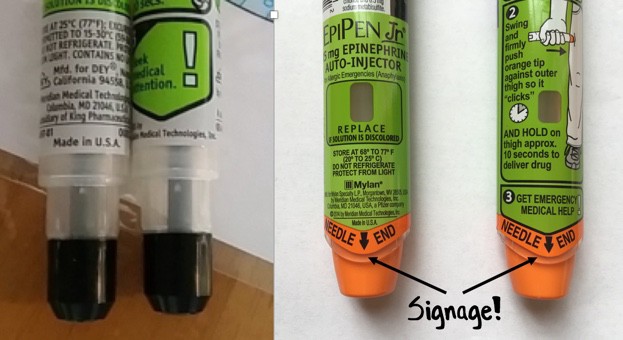
But while in 2009 Mylan redesigned the device, they didn’t change the orientation of the cap and needle. Instead, they colored one end bright orange and gave it the label “Needle End.” No doubt the design tweak helped a little: according to one study, the new EpiPen has a success rate of 67 percent (the old pen had a success rate of 43 percent). But that same study compared the EpiPen to another epinephrine auto-injector, the Auvi-Q, which was recently taken off the market after being recalled for dosage problems. The Auvi-Q is designed with the cap and needle on the same end – and had a success rate of over 90 percent.

It’s not surprising that a new color and a label didn’t stop accidental injections entirely. The EpiPen is just one more example in a long tradition of designers “solving” design problems by adding instructions, rather than fixing the underlying design itself.

Now, it’s true that sometimes instructions are useful and necessary. But in many cases, if it needs a sign, it’s bad design.
_____________________________________ 

The Role of Metaphor in Design

by Joyce Lee, MD, MPH Physician, Designer, Researcher Promoting a Maker Movement for Health     doctorasdesigner.com

bad design

The left-sided photo shows the needle area of the old EpiPen. The right-sided photo shows the needle area of the currently available EpiPen. On both sides of the current EpiPen, there is text on the front and back with the words NEEDLE END in large capital letters accompanied by a large black arrow. A healthcare stakeholder wouldn’t even blink at this detail, but I must quote the great Don Norman, one of the founders of human-centered design:

“Any time you see signs or labels added to a device, it is an indication of bad design.”