Visualizzazione post con etichetta course. Mostra tutti i post

lunedì 9 aprile 2018

How to become a UX Designer at 40 with no digital or design experience

How to become a UX Designer at 40 with no digital or design experience

by Guy Ligertwood

How to become a UX Designer at 40 with no digital or design experience

What is User Experience Design?
User Experience Design is the process of enhancing a persons experience with a product or service and involves an understanding of their behaviour to create a successful design.
Example: A business has an app, they want the sign-up process to have a great User Experience (UX). You have business requirements. You find the engineers (computer programmers) limitations. You research, collaborate with designers and others. You create ideas and prototypes to test. You develop what is the best, test more and iterate on that. That’s UX.
There is a great demand for good UX Designers. If you have no previous digital or design experience don’t panic. I had neither and managed to get into the world of UX. I chose to be a UX Designer because it was creative, in technology and in demand (and I didn’t need to wear a suit to work!). My journey was not easy, I’ve had bumps along the way but I wouldn’t change a thing.
If you are willing to work hard, be patient, and work outside your comfort zone, it’s a really exciting career.

Topics I’ll cover:
Studying UX Design, the tools to learn, your UX portfolio, getting a job, the UX process, how to design, user testing , people you’ll work with and ongoing learning.

1. UX Study On Campus
2. UX Study Online
3. UX Design Tools
4. Prototype Tools
5. The UX Portfolio
6. Getting a UX Job
7. UX Process
8. How to Design
9. User Testing
10. People you’ll work with
11. Ongoing Learning & Staying Inspired
12. Final words

Your journey into UX Design ↪

lunedì 31 luglio 2017

The best UX and design conferences in 2017

The best UX and design conferences in 2017
A complete guide for designers who are looking for events and conferences to attend this year, or who are simply planning their next trip around the world.
by Fabricio Teixeira


Photo credit: Knak

A great way of learning more about User Experience and getting in touch with professionals who share the same passion as you is to attend UX Conferences and UX Events happening every year around the globe.

The events listed are the ones our team at uxdesign.cc have been to or would like to attend in the near future. Make sure you charge your smartphone, bring some business cards in your pocket and consider including one of these design events before or after your next trip.

  • Events about creativity and technology

  • Get together with local UX groups

  • Follow events in your area


uxdesign.cc

Foundations of Human-Computer Interaction

Foundations of Human-Computer Interaction

Goal and Outcomes.

This course introduces students to the field of human-computer interaction.

Introduction

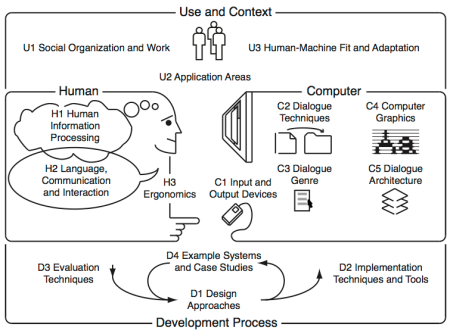
The body of knowledge of Human-Computer Interaction can be perceived as resulting from the following five interrelated aspects, depicted in the diagram bellow:

(N) the nature of human-computer interaction;
(U) the use and context of computers;
(H) human characteristics;
(C) computer system and interface architecture; and

(D) the development process.


This course touches the (N) aspect but mainly targets the (H) aspects illustrated in the diagram above. It comprises seven modules:

Visibility, Affordances, Mapping, Constraints, Conceptual models
Seven stages of action, Types of knowledge
Feedback, Errors, Forcing Functions, Gestalt laws, Responsiveness
The Human Processor Model, Fitts Law
Interface Efficiency, KLM, GOMS
State transition diagrams, Petri nets
History and vision
After successfully attending this course, students will know how user interfaces have developed over the past decades, and what constants of human performance need to be considered when designing user interfaces.

Further details are available including…

  • The pedagogical script;
  • The technical script;
  • The assessment criteria; and
  • The bibliography.


Foundations of Human-Computer Interaction

lunedì 24 luglio 2017

Wichita State University’s Engineering 101 courses

Wichita State University’s Engineering 101 courses


Human Factors Ph.D. Program


Welcome to the class blog for Wichita State University’s Engineering 101 courses.

Engineering 101 is a three-hour course specifically designed for College of Engineering freshmen and transfer students in their first year at Wichita State University. This course provides application to being both engineering students and practicing engineers.

...
In human factors, of course, we are specifically concerned with human interfaces. Typically, research in this field is geared towards improving productivity and reducing errors and injuries, and you can usually separate this into two categories: the application of human psychology and the implications of human anatomy.

Good psychological human factors design would include systems which are intuitive – someone new to the interface can operate it with little or no instruction. Can you think of any examples?

Good anatomical human factors design includes systems which are physically natural – using the system requires little strength or effort, or it could be used many times or over a long period without stress or injury. Can you think of any examples of this? ...

********************* 

Human Factors submissions

An example:

Human Factors – TuTh0930 – Spencer Shield


The problem:
The problem with spray bottles is that it is hard to read whether or not it is open at first glance. Most spray bottles have a labeling system of just being embossed on the nozzle with the words “on” or “off”. This way makes it hard for people with bad eye sight to understand whether or not it is open.

This is on.


This is off.


The solution:
The solution for this problem is to have the nozzle be color coded like stop lights. This makes it so people can tell if the nozzle is locked or not without having to strain their eyes. This solution is very practical and can be implemented easily in the production line. I think the original designers didn’t do this because of the cost of adding this step to the  production line.

The implementation:
The design would look like the fallowing. The red stands for when the nozzle is locked. The green stands for when the nozzle is unlocked.


lunedì 3 aprile 2017

Free-webinars

Free-webinars


Each month, UX Design Edge offers FREE webinars on a variety of provocative, important topics. Here are the upcoming webinar dates: